
Every so often I am reminded of tasks we should all undertake to ensure that all the components that make up our “system” is in top shape. This happened yesterday with one of my Sennheiser wireless mics that needed a firmware update.
I use the word “system” as these days, for most, it is more than just a computer on a desk that needs backing up on a regular basis to retain the integrity of the data.
(Just WHEN was the last time you backed up?)
Not Just Backups
This is probably even more true for those of us who dabble in the video and photography area.
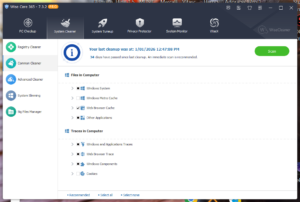
The most obvious of these is giving the computer operating and file systems a clean up on a regular basis to remove junk files and just make sure everything doing what it should. For years I have used a program called Wisecare 365 for this on my PCs and it is a regular Sunday morning job taking just 10 minutes. The freebie version does a good job, but the paid version, which is inexpensive and good for 3 computers (last time I looked) is excellent at looking in every nook and cranny of the OS for anything untoward.
For backups, considering the size of some of the files I have due to video captures, I use MACRIUM Reflect married to a SanDisk ProBlade with 2TB removable SSD inserts.
Not The End of It
But that’s not the end of it; in this digital there are other things you need to do on a regular basis. Think about it. Every single digital device that is connected to your computer (at least) has some soft of firmware or software, and these often get updates to ensure they are working to capacity, fix bugs, add new features and so on.
In my own case this involves a RØDECaster Pro II and RØDECaster Video consoles, Blackmagic Design ATEM Mini Pro, various wireless mics, cameras, gimbals, drones and of course mice, keyboards, printers, scanners and 3D printers.
While some devices will check to see if there are updates, this is not always the case. Many need you to go into an information section either in its software or firmware and do a check.
And of course software itself is continually being updated.
It doesn’t take much to do a check, and if you make a point of doing it regularly at a set date in the month for example, it doesn’t disrupt too much and makes sure everything keeps running smoothly.
One Comment
Very worthwhile article, thanks David. I too use Macrium Reflect but I also rely on a piece of software that came highly recommended by a computer guru I follow (and have absolute faith in 🙂 and that is UnigetUI. No idea why it should be called that (and not about to give it any further thought) but it regularly (auto) scans for any updates and you can then chosse whether to install or not. Could be useful to you?
Still marvel at your productivity, for so many years now. Keep it up, please. LOL