
Many years ago I had a friend who was a genius programmer and knew (it seemed), every computer language under the sun at the time.
BASIC, COBOL, Fortran, C, C++, Pascal – he knew ‘em all.
Problem was, if given a task, he’d start to drift sideways as he found something that while associated, was not a part of the focus but more interesting, and as such always need to brought to heel.
I feel like that a little bit at the moment.
My foray into the DJI OSMO Pocket 4P, which continues to amaze me more each day, has drawn me into other areas I have never really gone into in any depth.
And today is no exception. Playing around with colour spaces and LOG formats the last few days led me, as you do, back to the Blackmagic Camera app, which in my case is installed on a Samsung S24 FE smartphone.
Now this is not the ideal camera for the app for a number of reasons; it is not a flagship model like the S25 – and that is important for one major thing I’ll get to in the context of this story. But I did wonder if I learnt a little bit more about it, how good it is in day-to-day use as against the generic built in camera.
Blackmagic Design
A bit of background first though for those who are maybe not familiar with Blackmagic Design.
A quick look at its website will tell you that this is a company – Australian by the way – that has a deep knowledge of broadcast technical stuff. That’s what they design and make. It stands to reason, then, that if they have engineers and programmers that can make broadcast cameras, intelligent switchers and of course develop DaVinci Resolve and Fusion, they have some smart folk in there.
So, what might these engineers and programmers develop if asked to put something together that worked on a smartphone? Android and iPhone.
The result of course is the Blackmagic Camera, now at version 3.4.1.
Blackmagic Camera
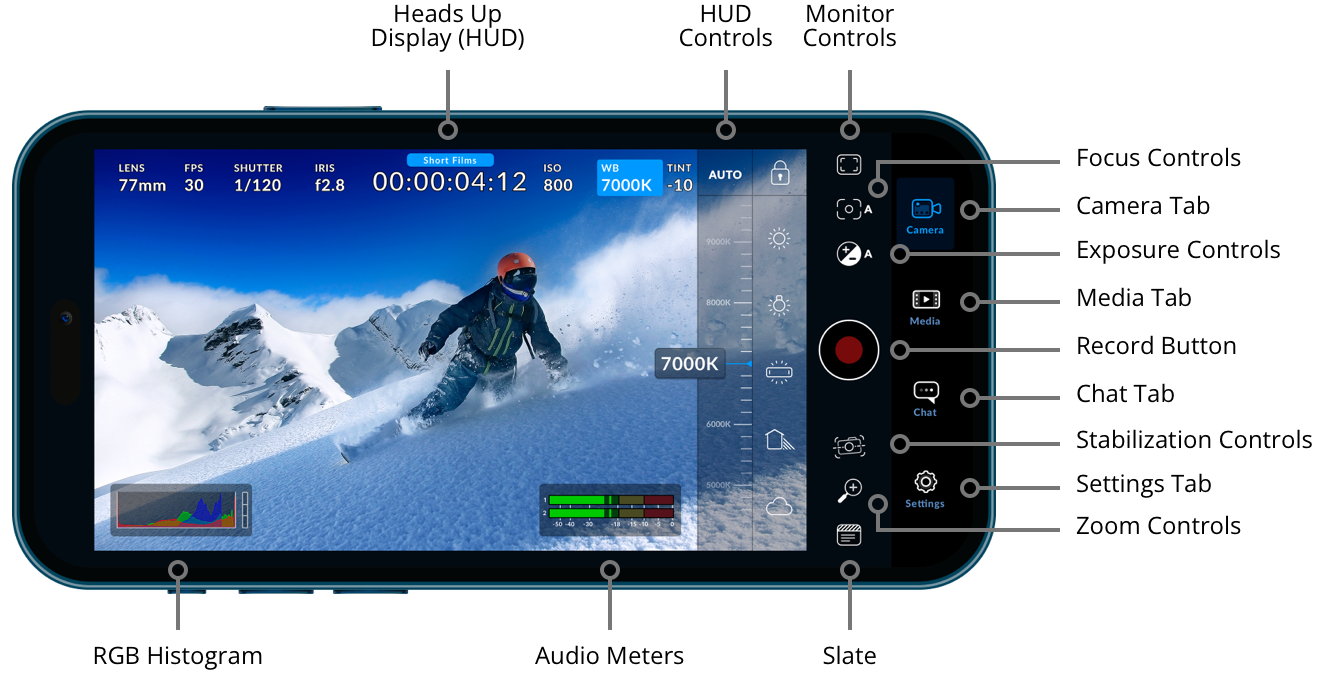
When you dig into the settings of the app (some are dependent on the underlying OS and specific phone model) and understand the basics of photography and video in terms of aperture, shutter speed, ISO, shutter angle, you begin to understand just HOW clever those engineers and programmers are to be able to stuff all this tech into a smartphone.
(I have tutorials on those subjects by the way at my YouTube portal)
Not to mention, Blackmagic Design gives it away (as it does DaVinci Resolve too).
The bottom line though, is it better than using your default camera in your smartphone?
In my case, the answer is a resounding yes.
Proof in the Pudding
These two clips show it. The first is from the Samsung 24FE’s generic camera and the second from the Blackmagic Camera. The colour space used for the generic camera is Rec.709 – the default for just about everything such as YouTube, TV, computer monitors etc. The Blackmagic Camera was shot in the BT2020 HLG10 colour space to take full advantage of the app’s capability, and you can clearly see the difference.
Footage from Samsung S24FE Smartphone
Footage from Blackmagic App
A quick look at the colour in the lavender flowers alone tell you. The Samsung has it seemed swung more towards the green end wheras the Blackmagic colouring of the scene is more what it really looks like in the current light, which is grey and overcast.
By the way, the difference in the actual framing is due to different lenses being used and because of some of the settings you can play around with in the Blackmagic Camera app.
ND Filters
One important point I need to mention. The experts suggest changing the camera shutter speed option in the Blackmagic Camera apps settings from speed to angle and make it 180°. This will give you better cinematic effects with the proviso that as smartphones have a fixed aperture, you’ll need to get an ND filter to compensate in bright sunlight.
For flagship cameras that is no biggie– companies like Freewell and Neewer make snap on filters for these cameras. My S24FE is not a flagship as mentioned, so I would have to use a clip-on variable rate ND filter, also from Neewer.
The alternative, which will not yield as good results is to keep the shutter speed as speed, crank it up to even 1/8000th of a second (in very bright sunlight), and adjust your ISO accordingly)
Of course, you could now bring that footage into DaVinci Resolve and tweak it even further which is probably my next – ahh – diversion. I don’t doubt many people me would easily make this an even better image with a bit of tweaking and colour space and grading knowledge.
If you want to have a play with the Blackmagic Camera app, you can get it from the Google Play store (for Android) or the Apple app store for iOS. More information here.
If you want more info on the basics of colour space to take advantage of the LOG format’s available depending on your phone, my story from the other day will help.