
With the Mission 1, GoPro is attempting to reinvent the action camera and, in the process, add in some features of standard compact type cameras. It has done so very ably, especially with the addition of the hand grip and the latest firmware upgrade.
If you get the ILS version of the camera, then you of course have the additional benefit of interchangeable lenses, but personally, I think I would probably opt for a more conventional camera like those from Fujifilm, Panasonic (LUMIX), Sony or Canon.
One accessory I have always found useful for all GoPros however, is the Media Mod and with the Mission 1 version, GoPro has upped the ante a bit.
Description
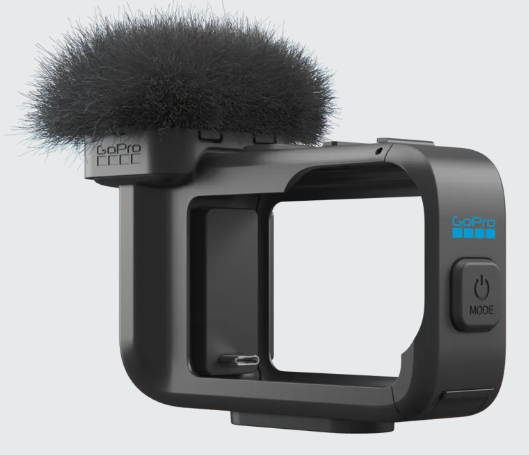
For those not aware, the Media Mod is a “cage” the GoPro slips into and couples to the device via the USB-C port. You have to remove the door of the port from the camera, but this is an easy exercise and takes just a second to remove – or put back later.
On previous models, the addition of the Media Mod added an external microphone with windsock fluffy, plus ports for a 3.5 audio cable (in only), USB-C and micro HDMI. It also sported top and side mounted cold shoe mounts.
The Mission 1 version has added an extra 3.5 I/O port, a separate headphone port, dramatically beefed up the externally mounted mic and made various internal capability tweaks thus improving the overall effectiveness and usability of the Media Mod.
Microphone
The built-in microphone has a multipattern capability and can optionally be altered into 1 of 8 different settings – front cardioid, rear cardioid, bi-directional, omni-directional, focussed stereo, natural stereo, immersive stereo and variable stereo.
Additionally, via the 3.5mm socket, GoPro says it supports both the RØDE Videomic II and Go II, the Sennheiser MKE400 and Comica VM10 Pro.
Specific wired wireless mic receivers are also compatible and those listed are the DJI Mic 3, 2 and Mini, RØDE Wireless Micro, Go 3 and Pro, however, recently Sennheiser also upgraded its firmware and so the Profile series of wireless mics now also works.
USB-C mics are not supported by the Media Mod unfortunately.
Time Sync Port.
The second audio port can also be used in conjunction with a suitable timecode generator to write timecode data to the recorded media’s metadata. This allows perfect synchronization of media recorded at the same time but captured with different cameras or capture devices.
HDMI Port
The below table shows all of the HDMI options and restrictions available. Note that 4K 4:3 HDMI is not supported and nor is HDR HDMI.
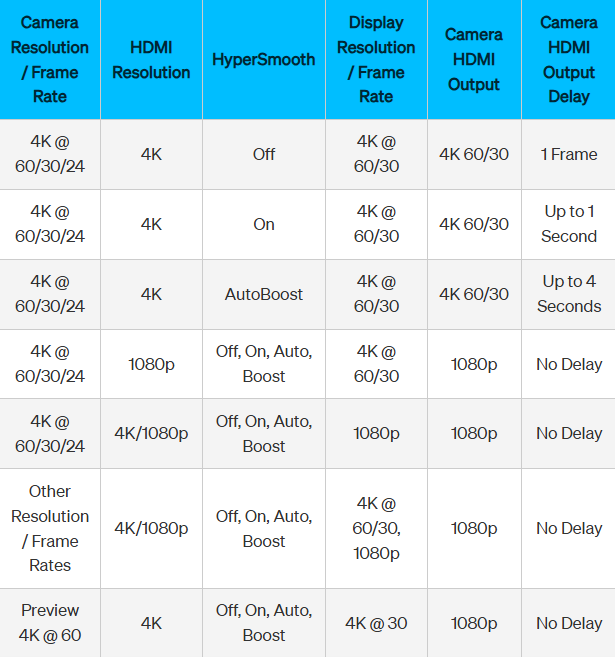
The rear display is still live when monitoring, recording or playing back of HDMI streams, but the front screen is not supported nor is QUIK viewing on a smartphone. You do have the option to switch off any messages etc to get a clean HDMI feed.
Other
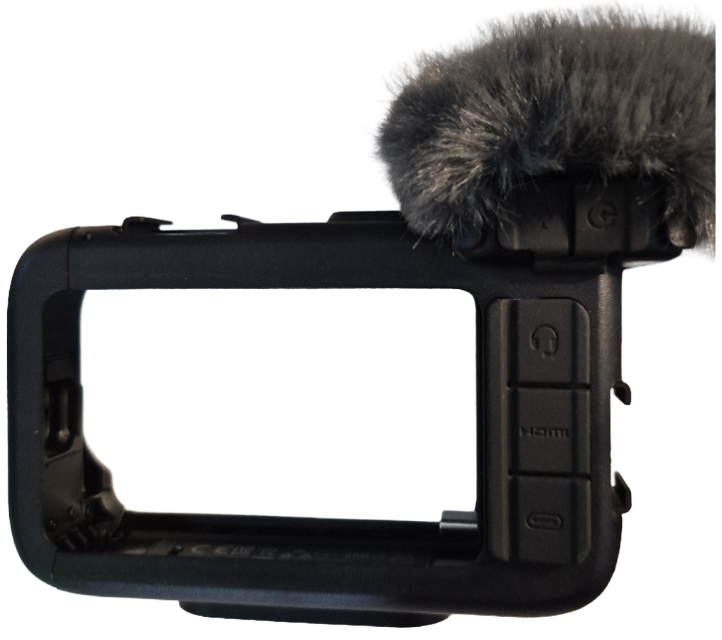 Unlike previous models, if using USB-C power in, there is no requirement to remove the internal camera battery, and thankfully, the covers over the ports have been improved as previous ones tended to snap off with constant use from my experience. GoPro also says that although there is no official IP rating, when the ports are closed, the camera and Media Mod can safely be used in environments that are dusty or sandy as well as in rain or snow.
I have successfully used the GoPro Mission 1 with the Media Mod and HDMI connection to both an Blackmagic Design ATEM Mini Pro and RØDECaster Video.
If you require decent audio or HDMI output, I’d suggest the Mission 1 Media Mod is a must have accessory. Its retail price is $229.95 or if a GoPro subscriber, $183.96.
There is more information on the dedicated GoPro Mission 1 Media Mod web page here.