
I have had ancillary equipment coming out of my ears the last few days. What with consoles (Stream Deck), 360° cameras (Insta360 X6), and wireless mics (Insta360 e-ink Mic) plus software in various guises its been busy, busy, busy, sifting through and trying to work out what to prioritise and when.
Yet another parcel turned up this morning, this time from Syndey based Kayell which distributes anaram and Aputure products among others, and in the box was the new amaran 4K webcam and amaran USB-C desktop mic.
Now this little wonder (the camera I mean) is a teeny bit special as it has some smarts built in. I can’t fully test those as yet as the shipment was missing a rather needed device, in short, amaran Verge lights which will apparently be arriving later.
’Cause you see, the camera via – yep you guessed it – “AI” (sorry Trump) will set all the appropriate controls and parameters to get the best possible image. Without seeing in-depth technical specs, I am assuming this means aperture, ISO, contrast and brightness, and possibly sharpness and saturation.
I’ll do more on that when I can physically test it and I’m looking forward to it.
amaran Desktop
What I wanted to make a quick mention of though is the amaran desktop software.
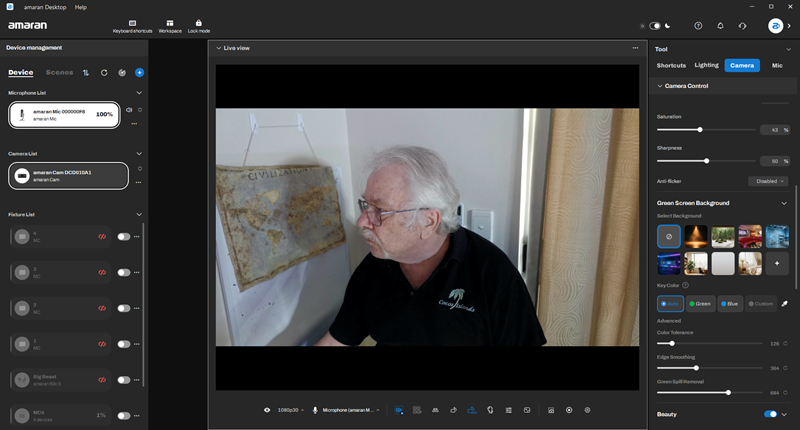
What amaran have cleverly done is not just release a very, very capable webcam and lights, but build an entire ecosphere around its products with the desktop software as the hub.
One neat trick is that as the camera attaches to its mount by magnets, it allows both a landscape and portrait orientation.
In addition to the webcam then, the software also has the functionality to control supported lights and microphones and can even be itself further manipulated by a plug in for the Elgato Stream Deck.
With this you can customize shortcuts and presets, adjust the brightness or colour temperature from a dial, lights in real-time, or recall effects in real-time — all from the Stream Deck.
The software is in itself very elegant if I may use such a word and certainly passes my pub test of being operable without needed to resort to YouTube tutorials, online Wikis, PDFs or anything else to get up and running.
I intend to spend some time on this setup, so if you are looking at upgrading your vodcasting or podcasting setup, stay tuned.