
For quite some time now I have advocated that those who wish to perform some sort of editing on any video they have shot – whether it be standard or 360°, or you own a Mac or a PC – use DaVinci Resolve to do so.
My reasoning is simple:
- It’s very powerful
- It’s available for both platforms as well as LINUX if that’s your thing
- It’s free in its base form
I also clarify that further that “base form” does not mean it’s a super cut down version to entice you to buy one that actually works. In that base form, DaVinci Resolve actually puts to shame many full powered editors costing many hundreds of dollars, or worse, only available on a subscription basis.
In some cases, it even makes obsolete 3rd party or other vendor apps you need.
Additionally, DaVinci Resolve has so much functionality, you may even find that a lot of the ancillary programs you use to create material for your videos may no longer be needed. I know I did.
Further, after you have downloaded Resolve, you are guaranteed to get all future updates, enhancements and bug fixes absolutely free.
Grant Petty, the founder and owner of Blackmagic Design who develop the program, says so.
Fusion
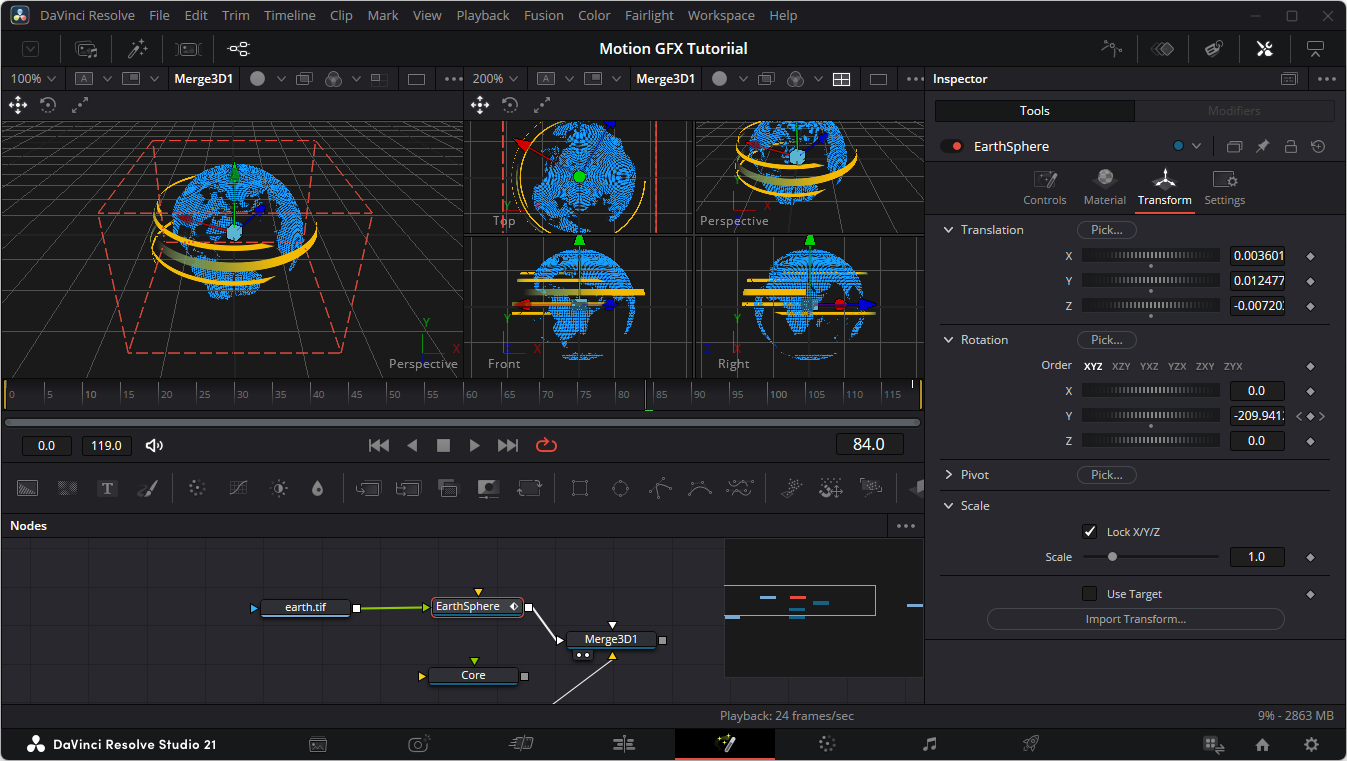
I have become pretty au fait with the editing side of DaVinci Resolve, but just recently I have delved into some of the more “dark arts” of the program, specifically what is called the Fusion page.
In this part of Resolve, you get to play with the fun stuff, creating special effects, graphics and even working in true 3D space as you can see from the graphic.
I purposely avoided this side of Resolve as it uses a methodology I was not familiar with, called nodes, so I stuck to what I knew in terms of Adobe After Effects, Cinema 4D and even Photoshop among others.
However, now that I have spent a couple of hours or so running through the very excellent tutorials Blackmagic Design has made available on using the Fusion page, along with the free downloaded manuals for this section of Resolve, I find I had nothing to fear.
If anything, it is more logical and flexible than the older style twirly drop-down menus of other applications.
Other Features
I haven’t even mentioned the Photo Page (for still image editing and manipulation), the Fairlight page (unparalleled audio editing, tweaking and mixing) and the Colour Page for colour grading among other functionality in Resolve.
So, I urge you to have a look at the tutorials Blackmagic have, not just the Fusion based ones but others for the editing, visual effects, colour management and grading, audio, sound design, mixing, compositing, motion graphics and more.
Each tutorial has a video you watch along with, and tutorial files you can download to follow along with the tutor. These can then also be used to guide you in creating your own material by substituting images, text, footage and so on.
All the materials and downloads can be found on the Blackmagic Design website here. And there is also the Blackmagic Design DaVinci Resolve forums where you can ask questions and interact not just with other user, but DaVinci Resolve support staff and other folk from Blackmagic Design.
You can download DaVinci Resolve here.