
If I have said it once I have said it a thousand times – audio is as important as the video in your edited footage.
But sometimes, audio on a PC (at least) can be very frustrating, especially for newcomers, when setting it up.
Just today I had a scenario that could have driven a newbie to the art of audio and video editing to Uncle Dan’s for a top up of the drinks cabinet.
RØDE, Blackmagic, Sennheiser and Logitech
I run a RØDE ProCaster II coupled to both an Blackmagic Design ATEM Mini Pro and a RØDECaster Video console. The idea is that all my input audio is routed through the RØDECaster Pro II and then sent to where I want it to go, which is usually to the speakers 100% of the time and / or to either of the consoles for merging with video and subsequent storing on a Samsung T5 connected to either.
So, a typical setup would be 3 cameras plus computer screen output into the Blackmagic Design ATEM Mini Pro for video, an XLR Sennheiser MK 4 mic into channel one of the RØDECaster Pro II, audio from the computer (music etc) via USB into the RØDECaster Pro II and audio output from the RØDECaster Pro II (headphone out) into the Blackmagic Design ATEM Mini Pro plus via USB back to the computer for playback through the speakers.
On paper it sounds a little complicated, but it really isn’t.
Anyway, the audio levels are all controlled on the RØDECaster Pro II, especially the audio back to the speakers. So far so good.
Today though I changed the USB cable from the RØDECaster Video to the computer to a longer one – something I have been meaning to do for ages – and suddenly, for no specific reason I could think of, the audio control level for the speakers stopped working.
Oh, the audio was there OK, but there was no way I could turn it up or down. And this is the trap for young players.
Input / Output
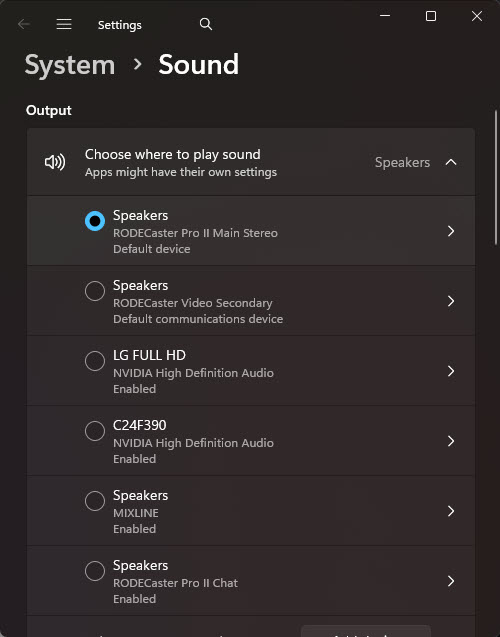
With Windows, you possibly have more than one audio input (and input) device – in my case there are about 6, as in addition to the Logitech audio system, there are the RØDECaster Pro II and RØDECaster Video, both of my monitors have audio built in and there are also numerous Bluetooth audio devices connected.
As I routinely route my audio through the RØDECaster Pro II, my selected audio out device is that, which in itself has two audio outputs – MAIN and CHAT and I use MAIN.
When I had re-plugged the new USB cable into the RØDECaster Video, Windows in its wisdom decided this was now my preferred audio out device and so the RØDECaster Pro II was being bypassed.
Sometimes intelligent devices are TOO smart for their own good!
All I needed to do was go into the Audio Settings portion of the Windows Control Panel and set it back to RØDECaster Pro II MAIN and all was again with the world.