
For those that are interested in using AI to create imagery, I just received this note from Adobe:
Earlier this month, we shared our vision for agentic creativity, and we’ve been so energized by the incredible response. Today, we’re taking the first step in bringing that vision to life with the public beta of Firefly AI Assistant, powered by Adobe’s creative agent. Available globally starting today inside Adobe Firefly, the all-in-one creative AI studio, this is one of the most exciting betas we’ve ever shipped. Our creative agent is built to handle a wide range of prompts and workflows — but it’s your creative vision and direction that drives the outcome.
With Firefly AI Assistant, you describe what you want to create in your own words — whether it’s turning a product shot into a full set of social assets, building a mood board from a brief, or refining a set of headshots — and the assistant brings it to life by orchestrating and executing multi-step workflows across Creative Cloud apps. Instead of navigating tools or jumping between apps, you direct the outcome while the assistant handles the execution, using the right tools at the right time. You make the creative decisions: defining the vision, shaping the details and choosing what works. The assistant accelerates execution, so you can stay focused on the creative work that matters most.
This is just the beginning of a more connected and intuitive way of creating, and we’re excited to build it with you and shape the future of agentic creativity together.
Here’s what you can do with the Firefly AI Assistant public beta:
- Describe what you want to create in a single, intuitive chat interface — simply explain the outcome you want in your own words, and the assistant orchestrates and executes multi-step workflows across Creative Cloud apps, including Photoshop, Lightroom, Premiere, Firefly and more, to bring it to life.
- Tap into Adobe’s pro-grade tools — as the beta rolls out, the assistant will be capable of drawing from 60+ powerful, pro-grade tools across Adobe’s creative suite, like Auto Tone, Generative Fill, Remove Background, Vectorize, Presets, and more, to help you get to the best creative outcome, with additional tools and capabilities continuing to roll out.
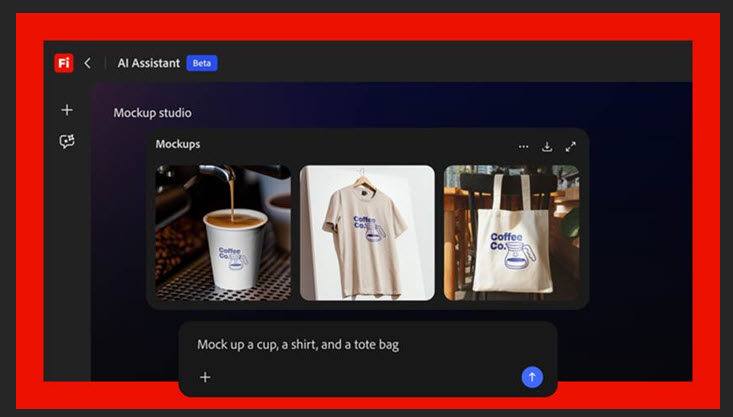
- Get started quickly with Creative Skills — pre-built creative workflows, shaped by feedback from our creative community and covering most-used tasks such as batch editing photos, building mood boards, retouching portraits, creating social variations and designing product mockups, with more on the way.
- Create and edit content across asset types — work across photos, videos, designs and more, with workflows that move seamlessly from initial concept to final output.
- Stay in control throughout the creative process — you see the steps the assistant takes, and it asks you questions along the way to stay aligned with your creative vision, so you can refine, redirect or take over at any point.
- Save and access your work across Adobe apps — save what you create with the assistant directly to your Creative Cloud storage, so your assets are ready whenever you open Photoshop, Illustrator, Premiere, or any other Adobe app.
What this looks like in practice:
- You’re a social media content creator at a high-profile event and want to post quickly. You upload a photo and ask the assistant to generate smart crops and variations — optimizing layouts and aspect ratios for Instagram, TikTok, Snapchat and Facebook, while preserving composition. In minutes, you’re publishing across channels with a cohesive look.
- You’re a graphic designer who needs a product mockup to get client sign-off on a logo for a new bakery. You upload the logo and an image of a cake box, ask the assistant to place it naturally on the packaging, and it automatically scales, aligns and matches lighting and perspective so the logo looks printed — not pasted. A quick follow-up prompt fine-tunes the placement, and the mockup is ready to share with your client.
We’re constantly adding new features to Firefly AI Assistant, so stay tuned for what’s next.
New Features in Adobe Firefly
In addition to the public beta of Firefly AI Assistant, we’re continuing to introduce new capabilities to the Firefly app, giving you the speed, control and creative freedom to move from idea to high-quality content. For example, we announced last week that OpenAI’s GPT Image 2 is now available in Firefly, joining a growing roster of the industry’s top creative AI models including Google’s Nano Banana 2 and Veo 3.1, Runway’s Gen-4.5, ElevenLabs’ Multilingual v2, Kling 3.0 and many more. We also recently introduced powerful new image editing capabilities like Precision Flow and AI Markup, giving you unmatched control and precision in how you create.
Bringing Our Pro-grade Tools to Third-party AI Models
Beyond Firefly, we’re working on bringing this new way of creating to third-party AI models like Anthropic’s Claude so you can access the best of our creative tools directly within the surfaces where you already work every day.
For the most powerful experience of creating with our tools and apps, Firefly AI Assistant is where you’ll have access to everything our creative agent has to offer — visibility into how your assets evolve at every step, the complete range of pro-grade tools our creative agent can draw from across our creative apps, and a personalized experience that learns your creative preferences over time. Regardless of where you work, we’re making sure that you have the best of Adobe always within reach.
Start creating with Firefly AI Assistant public beta today!
Firefly AI Assistant public beta will start rolling out globally today for customers on Creative Cloud Pro or paid Firefly plans (Pro, Pro Plus and Premium).