
Long term readers will know that I have been a supporter of Maxon and Cinema 4D for a l-o-n-g time. Since around 2002, I think.
Well, since the original German based company became a part of a US based conglomerate around 12 months ago or so, their attitude towards the media has changed somewhat, and despite the amount of support they got from here, have decided that they will now only support “influencers” – whatever THEY are.
Consequently, I need to find an alternative 3D modelling program and have been testing a number, a position I took and mentioned a few weeks back.
Blender
The last few days I have been looking at Blender, a fully featured program for modelling, animations and 3D motion graphics available for both Mac and PC, and astoundingly, being what is called “open source”, is free to download and use.
Up front, to learn all the ins and outs of a program like Blender – or indeed Cinema 4D itself – is not something you can do in a few days, or even a week or a month. They are very deep programs that take a lot of persistence and practice, so in checking out alternatives to Cinema 4D to give an opinion on what I might change to and can recommend to readers, I have decided to use a single initial criteria, and that is, how easy is it to grasp the basic concepts of 3D modelling, adding textures and animating etc from each package.
For this, a number of factors come into play, not the least being the interface – how do you actually communicate with the program?
Primitives
Basically modelling in 3D means starting out with primitive objects such as cubes, cylinders, pyramids, spheres and so on, and manipulating what is called the mesh, which is the geometrical polygons that go into making its shape as in Figure 1. These polygons are manipulated, shaped, extruded and so on to create the final object using a variety of tools in the program to do so.
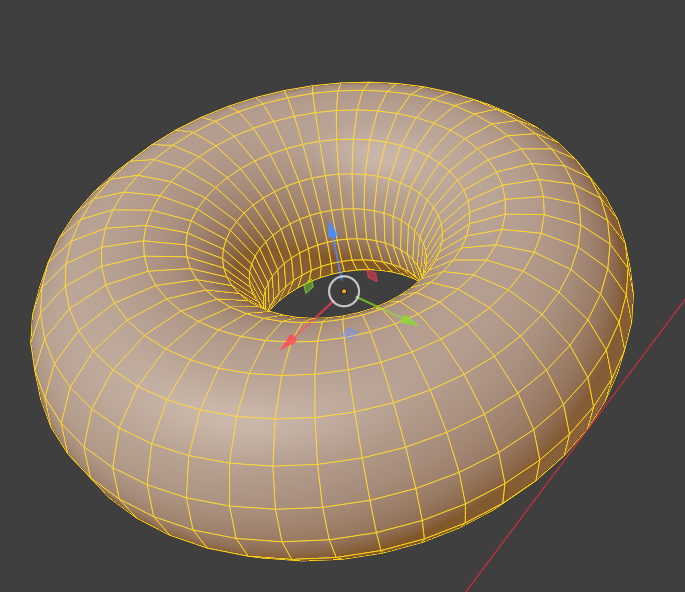
Additionally, you need ways to view and move objects around in 3D space to be able to perform these manipulations.
So how intuitive is Blender in these basics?
Difficult for a Raw Beginner
This is no criticism of the program as such, but it is fair to say without some assistance, a raw beginner wouldn’t have a snowball’s in hell chance of getting even close to doing something meaningful without assistance.
An analogy would be how to best make a 3-tier wedding cake if all you have is the ingredients and never even boiled an egg before.
Tutorials
But there are a number of ways of getting this to get you going.
The accepted best way is using what has become known as the “Blender Donut” series, a sequence of online tutorials that assume you know absolutely nothing. So far ,I have been through the first 2 tutorials and at least have picked up a working knowledge of the way the program works at the very basic level.
For absolute newcomers, you may need to run through these first two tutorials a couple of times to become familiar with what are unfamiliar concepts if you have never delved into 3D, and I suggest you take copious notes on the enormous number of Hotkeys that are used I the program (or alternatively, download the documented hot keys available from the YouTube page at https://www.youtube.com/watch?v=K1UyEdmSttQ)
Conclusion
From what I have seen so far, and I will be continuing the tutorials, Blender can certainly accommodate my needs for 3D and motion graphics / animation, but it will need a re-think on the way I am used to doing such things. I’ll keep you posted as I go.
If you just want to throw something together to print on a 3D printer though, there are better products to start with and I’d be looking probably at TinkerCAD which is also free – and a review coming soon).