
Every so often, usually on Facebook, a post pops up describing the best “settings” for cameras under specific circumstances eg landscape, night, portrait, sport, birds etc.
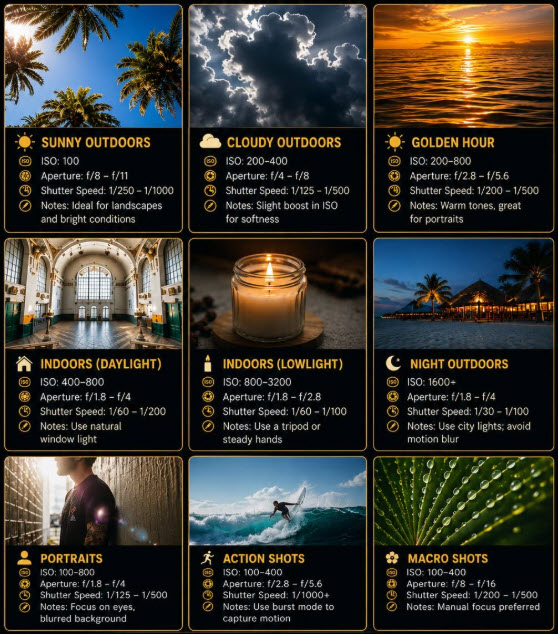
Below is an example.
In parallel, one of the most common questions in GoPro and similar forums is “What are the best settings for (situation).”
Up front, both of these scenarios do not have a definitive answer. The settings in the image below can be described as “starting points” at best.
Why?
Because the settings you use have a huge dependency on a number of different factors:
- Available light
- Lens in use (focal length)
- Environment
- Distance from subject
- Speed of subject
- The Composition being aimed for
- Depth of field
The settings on the camera that dictate these things are the aperture size in f/ stop value, shutter speed, ISO and the focussing, and it is imperative you understand all these to be able to use them to your benefit.
I have a bunch of tutorials of around 5 minutes each at my CC-TV channel covering these subjects that may help.
Histograms
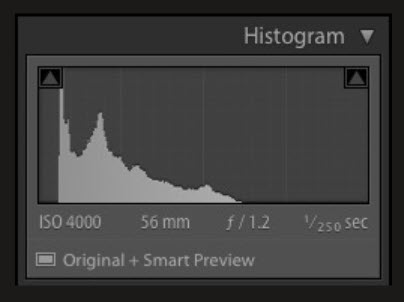
A major tool available in many cameras, and certainly professional ones, as well as drones you should also learn is the Histogram. This is a graph that shows the distribution of tonal values across an image, from pure black on the left to pure white on the right. The height of the graph at any point shows how many pixels in the image have that particular brightness.
Looking at a typical histogram:
-
-
- Left side — shadows and blacks
- Middle — midtones
- Right side — highlights and whites
- Height — how many pixels sit at that tone; a tall spike means lots of pixels share that brightness
-
The shape of the histogram also gives you major information about the image:
-
-
- Data pressed against the left edge — shadows are clipped, meaning some parts of the image have lost detail and turned pure black
-
- Data pressed against the right edge — highlights are clipped, meaning some areas are blown out to pure white with no recoverable detail
- Gap in the middle with two humps — high contrast scene, or two very different tonal areas (like a dark subject against a bright sky)
- Everything bunched in the middle — low contrast, flat-looking image
- A wide, even spread — a well-balanced tonal range, though this isn’t always the goal since a moody, dark shot or a deliberately bright, airy one will have a skewed histogram by design
If you are shooting video, you may also have access to a waveform and vectorscope and these are geared to exposure and colour.
If you have any questions on camera settings or using the histogram feel free to leave them in the comments.